Changelog
What's New on AdvantaCRM
See what’s new, improved, and fixed — every update that makes AdvantaCRM smarter, faster, and more reliable.
September 11, 2026
Expanded Coverage & Household Profiles

Features
Track more types of business: You can now add Life, Individual Health (ACA), and Annuity policies to client profiles, with fields tailored to each type of coverage.
Manage client households: Add children, parents, grandparents, and other household members without creating separate client profiles for everyone. Household information is automatically shared between connected spouses.
Store more secure client information: The Secure Information area now includes Social & Identification details, SPAP information, VA information, and Secure Notes for sensitive details such as portal credentials.
Record additional health details: Client profiles can now include height, weight, and tobacco use.
Fixes/Improvements
Redesigned the policy form to make adding coverage easier on desktop, tablet, and mobile.
Added plan search and moved the option to create a new plan directly into the plan list.
Improved long plan names so they remain easy to read.
Policy replacement choices now show only compatible coverage.
Social Security numbers format automatically while typing and remain hidden after saving unless revealed.
Improved household labels and added colors that make household members easier to identify.
Long notes now collapse into a shorter preview and can be expanded when needed.
Improved loading screens throughout the platform for a smoother experience with fewer empty-state flashes.
Improved the visibility of switches in dark mode.
Updated the agency assistant name from AdvantaIQ to Ava.
Understand automations more easily - New previews clearly explain what starts an automation, when it runs, how its branches are checked, and which actions will follow.
September 11, 2026
Expanded Coverage & Household Profiles
Features
Track more types of business: You can now add Life, Individual Health (ACA), and Annuity policies to client profiles, with fields tailored to each type of coverage.
Manage client households: Add children, parents, grandparents, and other household members without creating separate client profiles for everyone. Household information is automatically shared between connected spouses.
Store more secure client information: The Secure Information area now includes Social & Identification details, SPAP information, VA information, and Secure Notes for sensitive details such as portal credentials.
Record additional health details: Client profiles can now include height, weight, and tobacco use.
Fixes/Improvements
Redesigned the policy form to make adding coverage easier on desktop, tablet, and mobile.
Added plan search and moved the option to create a new plan directly into the plan list.
Improved long plan names so they remain easy to read.
Policy replacement choices now show only compatible coverage.
Social Security numbers format automatically while typing and remain hidden after saving unless revealed.
Improved household labels and added colors that make household members easier to identify.
Long notes now collapse into a shorter preview and can be expanded when needed.
Improved loading screens throughout the platform for a smoother experience with fewer empty-state flashes.
Improved the visibility of switches in dark mode.
Updated the agency assistant name from AdvantaIQ to Ava.
Understand automations more easily - New previews clearly explain what starts an automation, when it runs, how its branches are checked, and which actions will follow.
September 8, 2026
Quo Joins the Lineup

Quo is here—and your client conversations finally have a home.
Send texts directly from a client’s profile using the number they already know. Calls and messages land on the timeline automatically, right beside their notes, SOAs, and plan details.
Running solo? Connect your Quo account, choose your number, and start texting.
Running an agency? Connect the workspace once, match your team, and assign everyone a number. No API keys passed around.
Less tab hopping. Less “where did we talk about that?” More time actually talking to clients.
September 8, 2026
Quo Joins the Lineup
Quo is here—and your client conversations finally have a home.
Send texts directly from a client’s profile using the number they already know. Calls and messages land on the timeline automatically, right beside their notes, SOAs, and plan details.
Running solo? Connect your Quo account, choose your number, and start texting.
Running an agency? Connect the workspace once, match your team, and assign everyone a number. No API keys passed around.
Less tab hopping. Less “where did we talk about that?” More time actually talking to clients.
September 7, 2026
Hospital Indemnity Quoting

Building a Hospital Indemnity quote used to mean jumping between carrier tools, comparing benefits manually, and trying to figure out how much coverage would actually make sense for the client.
AdvantaCRM now does a lot of that work for you.
Automatically match MAPD gaps — We can look at your client’s current Medicare Advantage benefits, identify their out-of-pocket costs, and build a Hospital Indemnity quote designed to help offset those gaps.
Start with a ready-to-refine quote — Instead of building every benefit from scratch, AdvantaCRM gives you a strong starting point based on the client’s actual plan.
Adjust anything you want — Increase or decrease benefit amounts, add or remove riders, and watch the premium update as you build.
Build from scratch when needed — Don’t want to use the client’s MAPD plan? Start with a blank quote and configure it your way.
Compare carrier options — Build comparable options across multiple carriers without manually recreating the same quote over and over.
Save your best options — Save up to 3 quotes per client and come back to the exact benefits and pricing later.
From a client’s MAPD gaps to a ready-to-refine Hospital Indemnity quote in just a few clicks.
September 7, 2026
Hospital Indemnity Quoting
Building a Hospital Indemnity quote used to mean jumping between carrier tools, comparing benefits manually, and trying to figure out how much coverage would actually make sense for the client.
AdvantaCRM now does a lot of that work for you.
Automatically match MAPD gaps — We can look at your client’s current Medicare Advantage benefits, identify their out-of-pocket costs, and build a Hospital Indemnity quote designed to help offset those gaps.
Start with a ready-to-refine quote — Instead of building every benefit from scratch, AdvantaCRM gives you a strong starting point based on the client’s actual plan.
Adjust anything you want — Increase or decrease benefit amounts, add or remove riders, and watch the premium update as you build.
Build from scratch when needed — Don’t want to use the client’s MAPD plan? Start with a blank quote and configure it your way.
Compare carrier options — Build comparable options across multiple carriers without manually recreating the same quote over and over.
Save your best options — Save up to 3 quotes per client and come back to the exact benefits and pricing later.
From a client’s MAPD gaps to a ready-to-refine Hospital Indemnity quote in just a few clicks.
August 31, 2026
Automated Drip Campaigns Are Here

AdvantaCRM can now follow up with clients automatically based on what they actually do.
Build campaign journeys that send emails, wait between touchpoints, and branch based on actions like email opens, specific link clicks, or completed intake forms. Once a client takes the action you’re looking for, the campaign can stop automatically.
Set it up once, enroll your clients, and let AdvantaCRM handle the follow-up.
What’s included
Behavior-based email follow-up
Specific link and intake-form tracking
Yes/No campaign branching
Flexible delays and send timing
Automatic campaign stopping when a goal is reached
Personalized links and agent branding in every email
This is one of the biggest workflow updates we’ve released yet — and it’s built to make consistent client follow-up a whole lot easier.
August 31, 2026
Automated Drip Campaigns Are Here
AdvantaCRM can now follow up with clients automatically based on what they actually do.
Build campaign journeys that send emails, wait between touchpoints, and branch based on actions like email opens, specific link clicks, or completed intake forms. Once a client takes the action you’re looking for, the campaign can stop automatically.
Set it up once, enroll your clients, and let AdvantaCRM handle the follow-up.
What’s included
Behavior-based email follow-up
Specific link and intake-form tracking
Yes/No campaign branching
Flexible delays and send timing
Automatic campaign stopping when a goal is reached
Personalized links and agent branding in every email
This is one of the biggest workflow updates we’ve released yet — and it’s built to make consistent client follow-up a whole lot easier.
August 31, 2026
Booking Links in Intake Forms

Agents can now embed their booking link directly into an Intake Form, making it easy for clients to schedule an appointment while they’re already completing their information.
One form. One smooth flow.
August 31, 2026
Booking Links in Intake Forms
Agents can now embed their booking link directly into an Intake Form, making it easy for clients to schedule an appointment while they’re already completing their information.
One form. One smooth flow.
August 26, 2026
Download & Share Plan Benefits

Agents can now share or download a personalized Plan Benefits PDF directly from the benefits drawer. Each PDF includes the agent’s contact information, making it easy to send clients a clean copy of their plan benefits without leaving AdvantaCRM.
August 26, 2026
Download & Share Plan Benefits
Agents can now share or download a personalized Plan Benefits PDF directly from the benefits drawer. Each PDF includes the agent’s contact information, making it easy to send clients a clean copy of their plan benefits without leaving AdvantaCRM.
August 19, 2026
Ava - Now in Beta

Meet Ava, your new AI-powered CRM assistant. Ask questions about your clients, get quick profile summaries before appointments, look up Medicare plan benefits, check your book, build reports, or handle everyday tasks — all in plain English.
Ava understands follow-up questions and client context, so you can ask things like “Summarize Mary Jane,” “What dental does she have?” or “How many UHC clients do I have in Ohio?” without digging through the CRM yourself.
This is just the beginning. Ava is launching in beta, and we’ll continue expanding what it can do based on how agents actually use it.
August 19, 2026
Ava - Now in Beta
Meet Ava, your new AI-powered CRM assistant. Ask questions about your clients, get quick profile summaries before appointments, look up Medicare plan benefits, check your book, build reports, or handle everyday tasks — all in plain English.
Ava understands follow-up questions and client context, so you can ask things like “Summarize Mary Jane,” “What dental does she have?” or “How many UHC clients do I have in Ohio?” without digging through the CRM yourself.
This is just the beginning. Ava is launching in beta, and we’ll continue expanding what it can do based on how agents actually use it.
August 6, 2026
Custom Tags

Agents can now tag client profiles with their own custom labels — AEP Priority, Dual Eligible, Needs SOA, whatever fits your workflow. Add a tag right from the profile and it's instantly searchable and reportable, so you can build lists around exactly the segments that matter to your book of business. No more digging through notes to remember who's who.
August 6, 2026
Custom Tags
Agents can now tag client profiles with their own custom labels — AEP Priority, Dual Eligible, Needs SOA, whatever fits your workflow. Add a tag right from the profile and it's instantly searchable and reportable, so you can build lists around exactly the segments that matter to your book of business. No more digging through notes to remember who's who.
July 29, 2026
Certification Tracking

Track certification status across payers, organized by year.
View all certifications grouped by year (e.g. 2027, 2026), with the most recent year shown first
At-a-glance status badges — Certified (green), In Progress (yellow), Uncertified (red) — so you can spot gaps immediately
Add new certifications directly from the panel with the + button
July 29, 2026
Certification Tracking
Track certification status across payers, organized by year.
View all certifications grouped by year (e.g. 2027, 2026), with the most recent year shown first
At-a-glance status badges — Certified (green), In Progress (yellow), Uncertified (red) — so you can spot gaps immediately
Add new certifications directly from the panel with the + button
July 25, 2026
View Plan Benefits
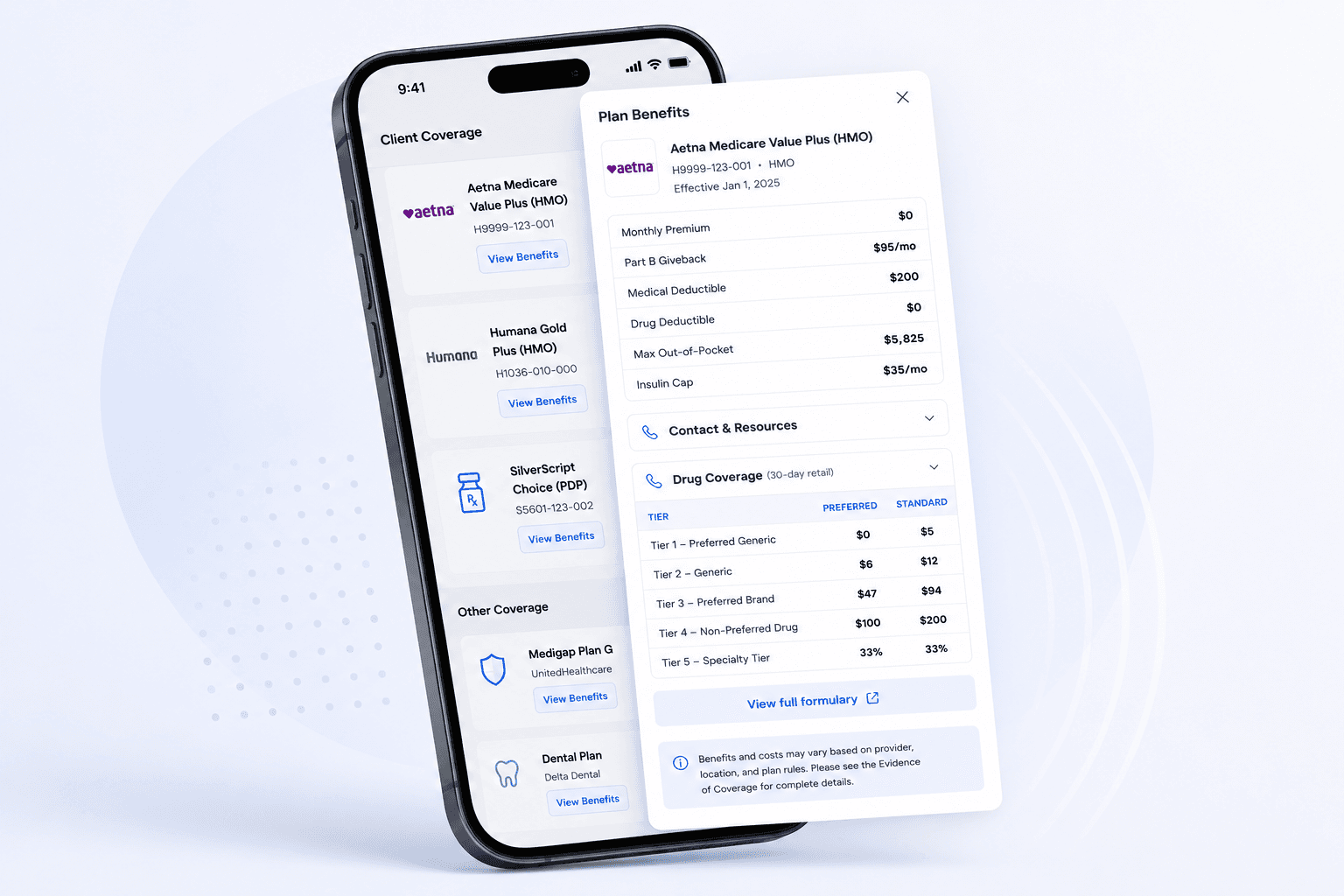
You can now view a full Medicare Advantage and Part D benefit summary directly from a client’s coverage card — no more digging through carrier websites or PDFs.
What it does
Tap “View Benefits” on any MA, MAPD, or PDP coverage card to open a detailed breakdown of the plan’s costs, drug tiers, and covered services in a slide-over drawer.
What’s included
Plan overview with premium, deductibles, max out-of-pocket, and star rating
At-a-glance view of supplemental benefits (dental, vision, hearing, fitness, telehealth, transportation, OTC, meals)
Drug tier costs with preferred and standard pharmacy columns
Contact info and quick links to the carrier’s website, pharmacy, formulary, and provider directory
Benefit categories organized by care setting with In-Network and Out-of-Network costs for PPO plans
Optional add-on packages when available
During AEP, you can toggle between the current plan year and next year’s benefits to help clients decide whether to stay or switch.
This only applies to CMS-backed plans. Med Supp and ancillary products won’t show the button since benefit data isn’t available for those plan types.
July 25, 2026
View Plan Benefits
You can now view a full Medicare Advantage and Part D benefit summary directly from a client’s coverage card — no more digging through carrier websites or PDFs.
What it does
Tap “View Benefits” on any MA, MAPD, or PDP coverage card to open a detailed breakdown of the plan’s costs, drug tiers, and covered services in a slide-over drawer.
What’s included
Plan overview with premium, deductibles, max out-of-pocket, and star rating
At-a-glance view of supplemental benefits (dental, vision, hearing, fitness, telehealth, transportation, OTC, meals)
Drug tier costs with preferred and standard pharmacy columns
Contact info and quick links to the carrier’s website, pharmacy, formulary, and provider directory
Benefit categories organized by care setting with In-Network and Out-of-Network costs for PPO plans
Optional add-on packages when available
During AEP, you can toggle between the current plan year and next year’s benefits to help clients decide whether to stay or switch.
This only applies to CMS-backed plans. Med Supp and ancillary products won’t show the button since benefit data isn’t available for those plan types.
July 18, 2026
Bookmarks & ID's
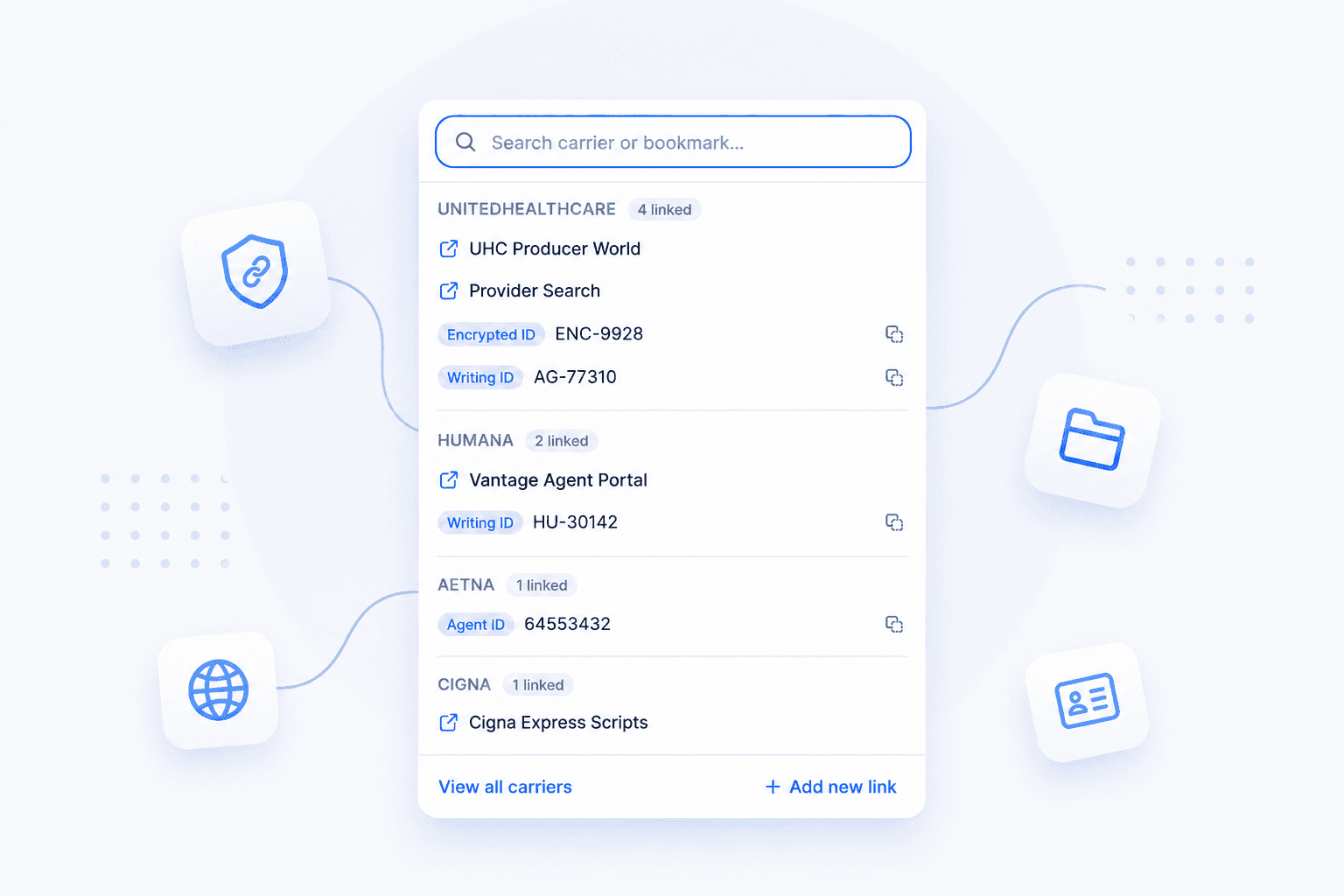
AdvantaCRM now has a dedicated spot for the things you reach for most: carrier portals, enrollment links, emails, and writing IDs. It's one click from the header, no matter what page you're on. Save any link or email and name it your way, then pull it up in seconds instead of digging through tabs or old messages.
July 18, 2026
Bookmarks & ID's
AdvantaCRM now has a dedicated spot for the things you reach for most: carrier portals, enrollment links, emails, and writing IDs. It's one click from the header, no matter what page you're on. Save any link or email and name it your way, then pull it up in seconds instead of digging through tabs or old messages.
July 17, 2026
Two-Factor Authentication

You can now add an extra layer of security to your account with two-factor authentication (2FA). Verify sign-in with an authenticator app, text message, or email — whichever you prefer.
Off by default and fully optional. To turn it on, head to Settings → Security and enable a method. Doesn't affect Google or Microsoft sign-in.
July 17, 2026
Two-Factor Authentication
You can now add an extra layer of security to your account with two-factor authentication (2FA). Verify sign-in with an authenticator app, text message, or email — whichever you prefer.
Off by default and fully optional. To turn it on, head to Settings → Security and enable a method. Doesn't affect Google or Microsoft sign-in.
July 15, 2026
Text Notifications

You can now receive important account alerts by text. Turn on SMS notifications to get a text when a new lead is assigned to you, when there's a security event on your account such as a password change, and when a task alert you scheduled comes due — so you can stay on top of your pipeline without being at your desk.
Texts are off by default. To enable them, head to Settings → Notifications, make sure your mobile number is on your profile, and switch on Enable SMS notifications. Message and data rates may apply, and you can reply STOP at any time to turn them off.
July 15, 2026
Text Notifications
You can now receive important account alerts by text. Turn on SMS notifications to get a text when a new lead is assigned to you, when there's a security event on your account such as a password change, and when a task alert you scheduled comes due — so you can stay on top of your pipeline without being at your desk.
Texts are off by default. To enable them, head to Settings → Notifications, make sure your mobile number is on your profile, and switch on Enable SMS notifications. Message and data rates may apply, and you can reply STOP at any time to turn them off.
July 11, 2026
Book Sharing

Built for agents who don't work alone. If a spouse, business partner, or staff member helps you manage your clients, you can now give them access to your book — view-only or full edit, one-way or a two-way swap. Everything stays within your agency, and you can revoke access anytime from the new Book Sharing settings.
July 11, 2026
Book Sharing
Built for agents who don't work alone. If a spouse, business partner, or staff member helps you manage your clients, you can now give them access to your book — view-only or full edit, one-way or a two-way swap. Everything stays within your agency, and you can revoke access anytime from the new Book Sharing settings.
July 2, 2026
Security Updates

Security PIN for Secure Information Access
Agents are now required to set a 4-digit Security PIN to access the Secure Information section on client profiles. This section contains sensitive data including MBI, Medicaid details, and Authorized Representative information. The PIN adds an extra layer of protection, ensuring this data is only visible after verification — even when an agent is already logged in.
Date of Birth Verification on Personalized Intake Forms
Client Intake Forms now include an identity verification step. When an agent sends a personalized intake form, the client must verify their date of birth before any pre-filled information is displayed. This prevents sensitive data from being exposed if a form link is opened by the wrong person.
July 2, 2026
Security Updates
Security PIN for Secure Information Access
Agents are now required to set a 4-digit Security PIN to access the Secure Information section on client profiles. This section contains sensitive data including MBI, Medicaid details, and Authorized Representative information. The PIN adds an extra layer of protection, ensuring this data is only visible after verification — even when an agent is already logged in.
Date of Birth Verification on Personalized Intake Forms
Client Intake Forms now include an identity verification step. When an agent sends a personalized intake form, the client must verify their date of birth before any pre-filled information is displayed. This prevents sensitive data from being exposed if a form link is opened by the wrong person.
June 29, 2026
Calendly Integration

AdvantaCRM now connects with Calendly. Link an individual account or connect your entire agency — either way, every booking flows straight into your CRM. New invitees become leads automatically, existing clients get the appointment on their profile, and shared team events route trackable leads to the right agent. You choose which event types we track, and reschedules and cancellations stay in sync on their own.
Paired with your Outlook or Google Calendar connection, the whole appointment flow — from booking to lead to calendar — lives in one place. Track it all directly in AdvantaCRM. No more logging appointments by hand. No more leads slipping through the cracks.
June 29, 2026
Calendly Integration
AdvantaCRM now connects with Calendly. Link an individual account or connect your entire agency — either way, every booking flows straight into your CRM. New invitees become leads automatically, existing clients get the appointment on their profile, and shared team events route trackable leads to the right agent. You choose which event types we track, and reschedules and cancellations stay in sync on their own.
Paired with your Outlook or Google Calendar connection, the whole appointment flow — from booking to lead to calendar — lives in one place. Track it all directly in AdvantaCRM. No more logging appointments by hand. No more leads slipping through the cracks.
June 29, 2026
Outlook Calendar Integration

AdvantaCRM now connects with Outlook Calendar. See your Outlook schedule right on your dashboard and create, edit, and delete appointments without ever leaving the CRM. Already running on Google Calendar? Connect both — your events show up side by side on one calendar, color-coded by source, so your whole day lives in a single view. No switching apps. No missed appointments.
June 29, 2026
Outlook Calendar Integration
AdvantaCRM now connects with Outlook Calendar. See your Outlook schedule right on your dashboard and create, edit, and delete appointments without ever leaving the CRM. Already running on Google Calendar? Connect both — your events show up side by side on one calendar, color-coded by source, so your whole day lives in a single view. No switching apps. No missed appointments.
May 20, 2026
Smarter Automations

Automations just got a major upgrade. Two new features make it easier to build and trust the workflows that run your book.
Validation panel. As you build an automation, AdvantaCRM now checks your work in real time. Missing a template? Forgot to pick a flow? Building a branch that can never actually run? You'll see it right away, before you turn the automation on. Less guesswork, fewer surprises.
Run history. Every automation now has its own Run History tab showing every time it fired, who it fired for, and what each step actually did. If something failed, you'll see why — and you can retry just that step with one click. Emails sent by an automation link straight to that client's conversation timeline so you can see the delivery status without leaving the page.
Together, these make automations feel a lot less like "set it and pray" and a lot more like a tool you actually trust.
May 20, 2026
Smarter Automations
Automations just got a major upgrade. Two new features make it easier to build and trust the workflows that run your book.
Validation panel. As you build an automation, AdvantaCRM now checks your work in real time. Missing a template? Forgot to pick a flow? Building a branch that can never actually run? You'll see it right away, before you turn the automation on. Less guesswork, fewer surprises.
Run history. Every automation now has its own Run History tab showing every time it fired, who it fired for, and what each step actually did. If something failed, you'll see why — and you can retry just that step with one click. Emails sent by an automation link straight to that client's conversation timeline so you can see the delivery status without leaving the page.
Together, these make automations feel a lot less like "set it and pray" and a lot more like a tool you actually trust.
April 10, 2026
Healthsherpa Integration

AdvantaCRM now syncs with HealthSherpa. Send contact data directly to HealthSherpa from a client record, and when an enrollment is submitted, the data flows right back — plan details, effective date, and status update automatically. No double entry. No toggling between tabs.
April 10, 2026
Healthsherpa Integration
AdvantaCRM now syncs with HealthSherpa. Send contact data directly to HealthSherpa from a client record, and when an enrollment is submitted, the data flows right back — plan details, effective date, and status update automatically. No double entry. No toggling between tabs.
March 1, 2026
AdvantaCRM 1.0 — Now Live

AdvantaCRM is here. The first Medicare CRM built from the ground up — with SOA tracking, automated workflows, call recording storage, and agency management built in from day one. HIPAA compliant.
After private beta, we're open to all agents and agencies. Welcome to the platform built for how you actually sell Medicare.
March 1, 2026
AdvantaCRM 1.0 — Now Live
AdvantaCRM is here. The first Medicare CRM built from the ground up — with SOA tracking, automated workflows, call recording storage, and agency management built in from day one. HIPAA compliant.
After private beta, we're open to all agents and agencies. Welcome to the platform built for how you actually sell Medicare.